
Fix a single line
Edit a sentence and regenerate just that line. The rest of the dub stays as it is.
From source video to a file ready to publish: MadeinVox isolates the voice, transcribes every speaker, translates, dubs with the voice you choose and remixes it all over the original music. You stay in control at every step.
Project · Product launch



Import
Done
Analysis
Done
Transcription
Done
Translation
Done
Voices
In progress
Export
Waiting
Every step produces a result you can check before moving on. Fix a detail and nothing restarts from scratch.
Paste a public YouTube link or upload an audio or video file up to 5 GB. For private videos, use file upload.
Speech is separated from music and ambient sound. The background track is kept so it can be remixed under the new voice.
The dialogue is transcribed with timestamps, and each speaker gets their own label. The source language is set by you or detected automatically.
Up to 12 target languages per video. Edit every translated line before the voices are generated: names, numbers, tone.
Automatic assignment, a choice of 18,000+ voices, or the speaker’s own voice when they consent.
Download the dubbed MP4, the audio on its own and SRT or VTT subtitles. Trim or reframe in the video editor.
Each page walks through what you can do, step by step, along with the questions creators and teams ask most.
Up to 12 target languages per video from 75 languages and 34 accents, with a translation you review line by line.
Learn more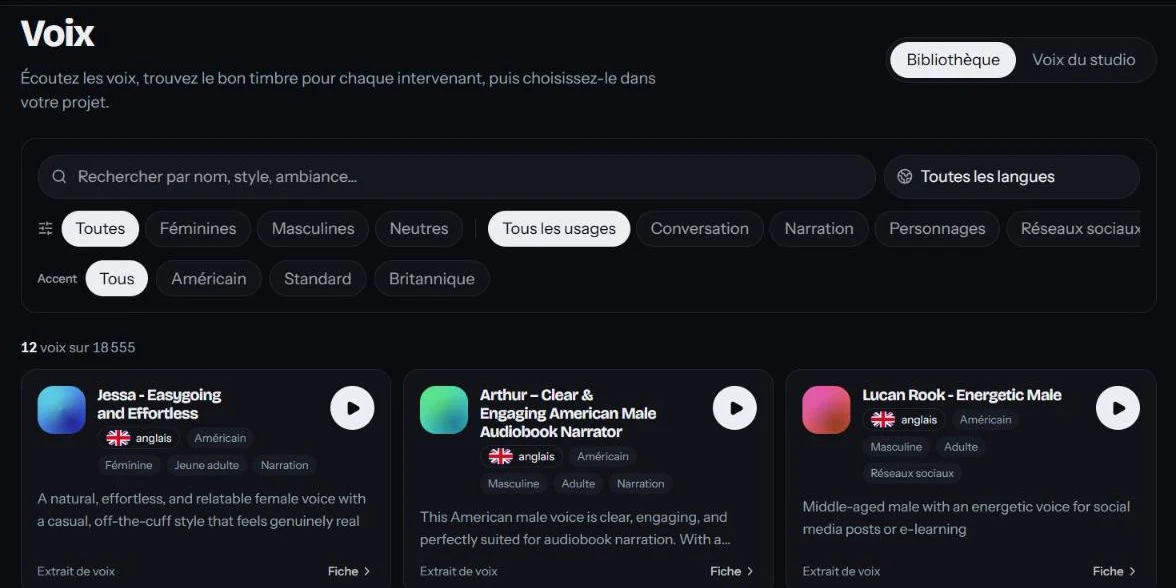
18,000+ voices to preview and filter, a distinct voice for each speaker, or the speaker’s own voice with their consent.
Learn moreTrim, reframe to 16:9, 9:16 or 1:1, rework the audio track and export without rerunning the dub.
Learn moreEdit a sentence and regenerate just that line. The rest of the dub stays as it is.
Set the volume of the original background track and how much it ducks under the dialogue before mixing.
SRT and VTT files generated for every version, ready for YouTube, a web player or an LMS.
Grab a frame from the video and download a 1280 × 720 PNG thumbnail, created right in your browser.
Invite collaborators, give each one a role and keep all of your team’s projects in one place.
Rights confirmation at import, the speaker’s voice only with their consent, and videos deleted 30 days after dubbing.
We’d rather give you a clear list than a vague promise. Here’s where the product stands today.
Available today
Not offered yet
MadeinVox
Create your workspace: you get 5 free minutes of dubbing when you confirm your email.