The right voice
for every speaker.

Once the transcript is ready, each speaker gets a voice. Let the studio choose, browse 18,000+ voices with filters and audio samples, or have the speaker talk in their own voice when they consent.
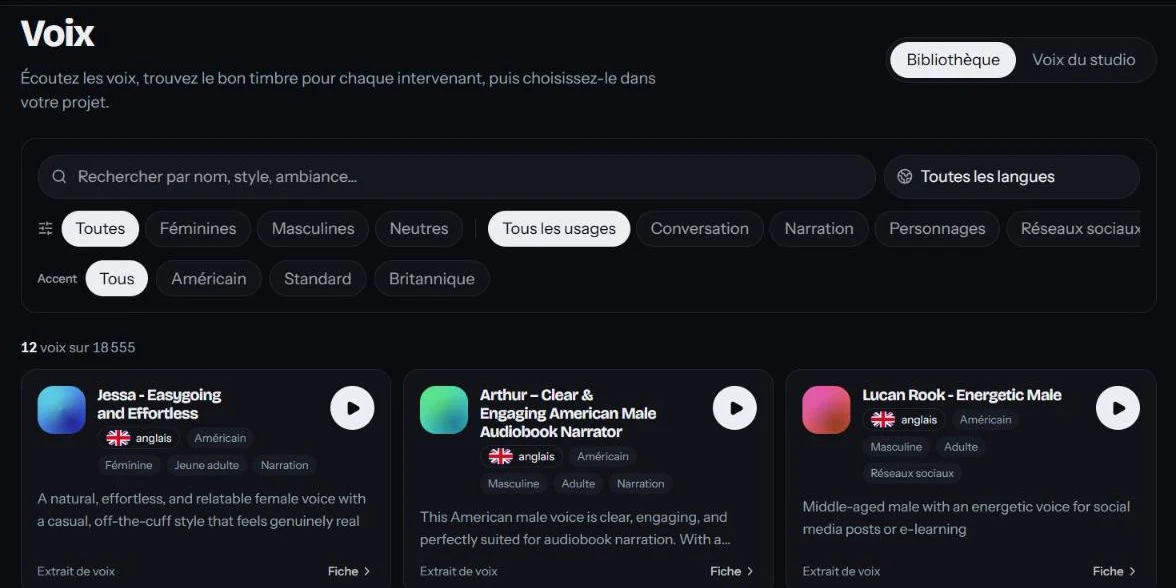
Voice library
voices in the library
18,000+
voices in the library
per speaker, kept for the whole video
1 voice
per speaker, kept for the whole video
regional accents available
34
regional accents available

From casting to final voice.

  1. 1

    Speakers are detected

    The transcript identifies each speaker and groups their lines, even when they speak again later on.

  2. 2

    A voice is suggested

    The studio automatically assigns a suitable voice to each speaker. You can keep it as is.

  3. 3

    You listen and swap

    Filter the library, play the samples and pick the voice that fits the character, the tone and the language.

  4. 4

    The dub keeps your cast

    Each speaker keeps the same voice throughout the video. You can choose a different voice for each target language.

Casting you control.

Search, filter, listen

Search by name, style or mood, then filter by language, tone, use case and accent. Every voice has a sample, a waveform and adjustable playback speed.

The speaker’s own voice

The speaker talks in the target language with their own vocal tone. Use only with their explicit consent.

Multiple speakers

Podcast, interview, panel discussion: every voice stays recognizable from one turn to the next.

Regional accents

American or British English, French from France or Quebec, Modern Standard Arabic or Moroccan Darija, and many more.

Change your mind without starting over

A line that needs another take is fixed and regenerated on its own, without rerunning the whole dub.

Library filters

Find a voice in seconds, even among 18,000.

  • Language spoken by the voice
  • Tone: female, male or neutral
  • Use case: conversational, narration, characters, social media, education, advertising, entertainment
  • Regional accent
  • Detailed profile: age, accent, languages spoken

Frequently asked questions

Do I have to pick a voice for every speaker?
No. The studio assigns a voice to each detected speaker. You only change the ones you don’t like.
Can I use my own voice?
Yes, with the “Speaker’s voice” option, as long as the person recorded has given explicit consent. Included from the Pro plan; otherwise, choose a voice from the library.
Can one voice speak several languages?
Many voices are multilingual. Their profile lists the languages they speak, and a filter shows the ones that speak your target language.
Can I listen to a voice before choosing it?
Yes. Every voice has an audio sample with its waveform, and you can adjust the playback speed.
What if the studio gets a speaker wrong?
Check the speakers after transcription. A misattributed line can be fixed before the voices are generated.
What happens if a line is already in the target language?
The studio spots it and keeps the original voice for that line, with no synthetic voice.

Other features

MadeinVox

Dub your next video.

Create your workspace: you get 5 free minutes of dubbing when you confirm your email.